
Skip to content

omni instruments | sensors and data acquisition equipment

Omni Instruments Ltd

Sales & Technical Support

  • +44 (0) 1382 443000
  • info@omni.uk.com
Omni Instruments Ltd
  • Home
  • Custom Systems
  • Our Brands
  • System Hires
  • About
  • Contact
  • Home
  • Custom Systems
  • Our Brands
  • System Hires
  • About
  • Contact
Products
  • Data Loggers
  • Displacement
  • Display & Control
  • Flow Meters
  • Gas Detection
  • Gyros & Accelerometers
  • Level & Distance
  • Load Cells
  • Pressure Sensors
  • Radio & GSM Telemetry
  • Remote Monitoring
  • Serial Ethernet & ModBus
  • Solar & Wind Power
  • Subsea & Offshore
  • Temperature and Humidity
  • Test & Calibration
  • Torque Transducers
  • Vibration Monitoring
  • Voltage & Current
  • Water Quality
  • Weather Instruments
  • Accessories
  • Data Loggers
  • Displacement
  • Display & Control
  • Flow Meters
  • Gas Detection
  • Gyros & Accelerometers
  • Level & Distance
  • Load Cells
  • Pressure Sensors
  • Radio & GSM Telemetry
  • Remote Monitoring
  • Serial Ethernet & ModBus
  • Solar & Wind Power
  • Subsea & Offshore
  • Temperature and Humidity
  • Test & Calibration
  • Torque Transducers
  • Vibration Monitoring
  • Voltage & Current
  • Water Quality
  • Weather Instruments
  • Accessories
  • Home
  • Custom Systems
  • Our Brands
  • System Hires
  • About
  • Contact
  • Home
  • Custom Systems
  • Our Brands
  • System Hires
  • About
  • Contact
Need Help?
£0.00 0 Basket
Product
  • Data Loggers
  • Displacement
  • Display & Control
  • Flow Meters
  • Gas Detection
  • Gyros & Accelerometers
  • Level & Distance
  • Load Cells
  • Pressure Sensors
  • Radio & GSM Telemetry
  • Remote Monitoring
  • Serial Ethernet & ModBus
  • Solar & Wind Power
  • Subsea & Offshore
  • Temperature and Humidity
  • Test & Calibration
  • Torque Transducers
  • Vibration Monitoring
  • Voltage & Current
  • Water Quality
  • Weather Instruments
  • Accessories
  • Data Loggers
  • Displacement
  • Display & Control
  • Flow Meters
  • Gas Detection
  • Gyros & Accelerometers
  • Level & Distance
  • Load Cells
  • Pressure Sensors
  • Radio & GSM Telemetry
  • Remote Monitoring
  • Serial Ethernet & ModBus
  • Solar & Wind Power
  • Subsea & Offshore
  • Temperature and Humidity
  • Test & Calibration
  • Torque Transducers
  • Vibration Monitoring
  • Voltage & Current
  • Water Quality
  • Weather Instruments
  • Accessories
£0.00 0 Basket

Tinytag Data Loggers

Tinytag Explorer Software
Home / Our Brands / Tinytag / Tinytag Accessories / Tinytag Software / Tinytag Explorer

Tinytag Explorer

Tinytag Explorer is the easy-to-use data logging software for Tinytag data loggers. Configure your data loggers, download and view recorded data and combine and compare different datasets, all in one place.

Features

  • Easily set-up your data logger with the settings that matter to your application.
    • Alarms: customise alarm limits to alert when measurements fall out of range.
    • Logging interval: decide how frequently your data logger takes measurements.
    • Logging description: label your logging run and your data.
  • Visualise your data in easy-to-read graphs and tables.
    • Intuitively zoom and scroll through data to view specific data points.
    • Identify minimum and maximum recordings.
    • Quick-view your data logger’s settings and activity statistics.
  • Analyse data and identify trends.
    • Graph overlay: combine and compare data from multiple loggers/ logging runs.
    • Top and tail: customise your graph to hide unwanted data.
    • Synchronise data: align multiple datasets to contrast and compare data.
  • Spend more time with your data and less time managing your loggers.
    • Work with multiple data loggers at the same time.
    • Launch, configure, offload and stop loggers at the same time or with the same settings.
    • Automatically save all downloaded data in the same file format.
  • Greater flexibility to work with your data.
    • Copy and paste data directly to another program.
    • Save your data in a supported file format (.xlsx, .xml, .csv and .txt).
    • Save graphs as images, ideal for presentations or reports.

Key Benefits

  • Easy-to-use, intuitive software
  • Data export to popular file formats: .xlsx, .xml, .csv and .txt
  • Bulk logger tool: work with multiple loggers at the same time
  • Works with all Tinytag data loggers
  • Never miss a calibration with calibration reminders
  • Site licence – multiple users at the same location for one price
  • Everything you need to download, view and manage recorded data
  • Includes a comprehensive illustrated help file
  • Expert technical support (Monday to Friday)

Aiding Compliance

Tinytag DI has been designed to help organisations comply with GxP regulations in controlled environments.

  • Fully traceable, attributable and complete data history aids data integrity compliance (including MHRA Guidance on GxP Data Integrity, FDA 21CFR Part 11 and BS EN 12830)
  • User access controls and closed, secure system restrict unauthorised access to data
  • Accurate data helps you make informed decisions about temperature-sensitive products during manufacture, storage and transportation
  • Ideal for regulated environments within medical, pharmaceutical and food industries

Frequently Asked Questions

â–¶ Q: Does a single Tinytag Explorer license cover multiple users?
A: Yes. The SWCD-0040 software is supplied with a Site License, which permits an unlimited number of users to install and run the software on multiple computers at a single corporate location or site. There are no recurring seat-based subscription fees.
â–¶ Q: Can I use SWCD-0040 to manage Tinytag Radio or LAN network data loggers?
A: No. The standard SWCD-0040 software is built exclusively for configuring and downloading data from standalone loggers via a direct USB cable or inductive offload pad interface. For automated, centralised wireless or network-connected logging configurations, the upgraded Tinytag Explorer Connect (SWCD-0080) software suite is required.
â–¶ Q: Does the software include the USB download cable required to connect my loggers?
A: No. The SWCD-0040 part number represents the single site software license and quick start documentation only. The required connection interfaces, such as the CAB-0007-USB cable for standard loggers or the ACS-3030 Inductive Pad for submersible loggers, are available separately, unless buying a combined software starter pack (e.g., SWPK-3-USB).
â–¶ Q: What is the function of the built-in "Top and Tail" feature?
A: The "Top and Tail" data-masking utility allows users to selectively hide unwanted or unrepresentative data points from the very beginning and very end of a logging run. For example, it enables you to trim away ambient warehouse readings recorded while a logger was being configured or packed, ensuring your final data profiles and statistical summaries reflect only the true transit or deployment window.
â–¶ Q: How does the software calculate dew point measurements?
A: Tinytag Explorer features an automated native Dew Point Tool. When you offload data from a dual-channel logger tracking both temperature and relative humidity simultaneously, the software applies integrated psychrometric formulations to generate a new, third data trace calculating the exact condensation and dew point profile across the timeline.
â–¶ Q: What file formats can I export my logged data to?
A: While Tinytag Explorer saves files natively in secure formats, data can be effortlessly exported or copied into standard external software suites. It supports exporting raw data values into Microsoft Excel (xlsx), comma-separated values (csv), structural text files (txt or xml), and directly saving visual graphical charts as image files for documentation reports.

SWCD-0040

SWCD-0040

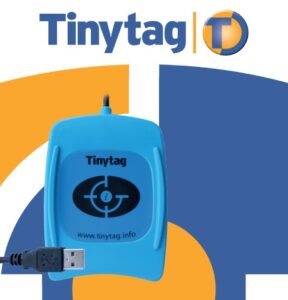
Tinytag Explorer software with English quick start guide. This software will guide you through setting up your Tinytag data loggers and can provide a printout of your settings for verification. It will also help you explore the more advanced features available. The Tinytag software comes with a site licence allowing installation on multiple PCs at the same location, additional software should be purchased when used at a different site location. * Please note that the Tinytag Radio System will need the enhanced version of this software.
£55.00
Add to Basket More Info

Software packs are also available. These come complete with the USB download cables to connect directly to your Tinytag Data Loggers. You can find more details below.

SWPK-3-USB

SWPK-3-USB

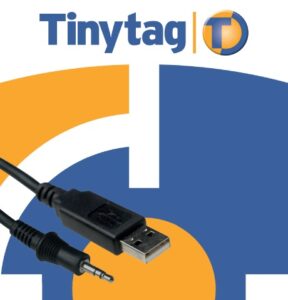
Tinytag Explorer Software and download cable starter pack. The SWPK-3-USB starter pack contains USB inductive pad, Software licence key and an English, French, German, Italian, Spanish and Swedish quick start guide. This pack is suitable for use with the Tinytag Transit, Splash and Aquatic data loggers. The Tinytag software comes with a site licence allowing installation on multiple PCs at the same location, additional software should be purchased when used at a different site location.
£75.00
Add to Basket More Info
SWPK-5-USB

SWPK-5-USB

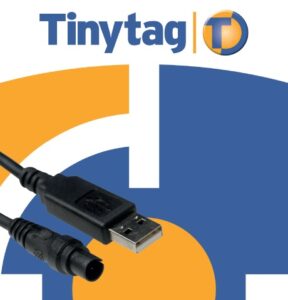
Tinytag Explorer Software and download cable starter pack. The SWPK-5-USB starter pack contains USB cable, Software Licence Key and an English, French, German, Italian, Spanish and Swedish quick start guide.. This pack is suitable for use with the Tinytag Transit, Talk 2 and CO2 data loggers. The Tinytag software comes with a site licence allowing installation on multiple PCs at the same location, additional software should be purchased when used at a different site location.
£65.00
Add to Basket More Info
SWPK-7-USB

SWPK-7-USB

Tinytag Explorer Software and download cable starter pack. The SWPK-7-USB starter pack contains a USB download cable, Software Licence Key and a quick start guide. This pack is suitable for use with the all Tinytag Ultra, Plus and View data loggers. The Tinytag Explorer software comes with a site licence allowing installation on multiple PCs at the same location, additional software should be purchased when used at a different site location.

£65.00
Add to Basket More Info

CONTACT US

8:30am to 5pm Monday to Thursday
8:30am to 3pm on Friday.

  • +44 (0) 1382 443000
  • info@omni.uk.com

A real person will answer the phone and deal with your enquiry.
You can also click the button below and fill in our online enquiry form.

Technical Sales

links

  • About
  • Contact
  • Custom Systems
  • Privacy & Cookies
  • Terms & Conditions

omni instruments

Omni Instruments Ltd,
Unit 1, 14 Nobel Road,
Wester Gourdie Industrial Estate,
Dundee, DD2 4UH, UK

Sales & Support

  • +44 (0) 1382 443000
  • info@omni.uk.com

Payments

mastercard-color
visa-color
amex-color
Copyright Omni Instruments 2026 | Design. Build. Host.

        We are here to help

        Need help with your products or have a question for us on our custom systems? Use the form below to send us a message and our experts will be in touch to help.

        Call us on +44 (0)1382 443000