

Skip to content

omni instruments | sensors and data acquisition equipment

Sales & Technical Support

  • +44 (0) 1382 443000
  • info@omni.uk.com
  • Home
  • Custom Systems
  • System Hires
  • About
  • Contact
  • Home
  • Custom Systems
  • System Hires
  • About
  • Contact
Products
Edit Content
  • Data Loggers
  • Displacement
  • Display & Control
  • Flow Meters
  • Gas Detection
  • Gyros & Accelerometers
  • Level & Distance
  • Load Cells
  • Pressure Sensors
  • Radio & GSM Telemetry
  • Remote Monitoring
  • Serial Ethernet & ModBus
  • Solar & Wind Power
  • Subsea & Offshore
  • Temperature and Humidity
  • Test & Calibration
  • Torque Transducers
  • Vibration Monitoring
  • Voltage & Current
  • Water Quality
  • Weather Instruments
  • Accessories
  • Data Loggers
  • Displacement
  • Display & Control
  • Flow Meters
  • Gas Detection
  • Gyros & Accelerometers
  • Level & Distance
  • Load Cells
  • Pressure Sensors
  • Radio & GSM Telemetry
  • Remote Monitoring
  • Serial Ethernet & ModBus
  • Solar & Wind Power
  • Subsea & Offshore
  • Temperature and Humidity
  • Test & Calibration
  • Torque Transducers
  • Vibration Monitoring
  • Voltage & Current
  • Water Quality
  • Weather Instruments
  • Accessories
  • Home
  • Custom Systems
  • System Hires
  • About
  • Contact
  • Home
  • Custom Systems
  • System Hires
  • About
  • Contact
Need Help?
£0.00 0 Basket
Product
Edit Content
  • Data Loggers
  • Displacement
  • Display & Control
  • Flow Meters
  • Gas Detection
  • Gyros & Accelerometers
  • Level & Distance
  • Load Cells
  • Pressure Sensors
  • Radio & GSM Telemetry
  • Remote Monitoring
  • Serial Ethernet & ModBus
  • Solar & Wind Power
  • Subsea & Offshore
  • Temperature and Humidity
  • Test & Calibration
  • Torque Transducers
  • Vibration Monitoring
  • Voltage & Current
  • Water Quality
  • Weather Instruments
  • Accessories
  • Data Loggers
  • Displacement
  • Display & Control
  • Flow Meters
  • Gas Detection
  • Gyros & Accelerometers
  • Level & Distance
  • Load Cells
  • Pressure Sensors
  • Radio & GSM Telemetry
  • Remote Monitoring
  • Serial Ethernet & ModBus
  • Solar & Wind Power
  • Subsea & Offshore
  • Temperature and Humidity
  • Test & Calibration
  • Torque Transducers
  • Vibration Monitoring
  • Voltage & Current
  • Water Quality
  • Weather Instruments
  • Accessories
£0.00 0 Basket
Home / Water Quality & Waste Water Management Systems / ORP-250
ORP-250
ORP-250 - Image 2
ORP-250 - Image 3

ORP-250

500ml Bottle of 250mV ORP Calibration Solution for Direct Calibration.

£80.00

Need help finding the right product?

CONTACT US
  • Description

Description

ORP electrodes should be calibrated at least once a month to ensure optimum accuracy. Full calibration involves calibrating at a single point, using a +250mV ORP Calibration Standard. Ideally, the calibration should be carried out at 25°C, but the probe will automatically compensate for temperature variations in the calibration solution during calibration.

Calibrating the ORP Electrode

To calibrate the ORP electrode using the ORP-250 calibration solution, you will perform a single-point calibration. This process involves immersing the probe in the calibration solution, allowing the readings to stabilise, and then confirming the calibration on the Aquameter, or BlueLink Device.

Solution Needed: ORP-250mV calibration solution (ensure it is fresh and not expired).

  • Procedure:
    1. Preparation: Remove the protective cap from the ORP electrode. Wash the Aquaprobe thoroughly with deionised water and dry it gently.
    2. Immersion: Gently lower the Aquaprobe into the ORP-250mV calibration solution, ensuring the ORP electrode is fully submerged.
    3. Stabilisation: Allow the probe to remain in the solution until the ORP readings stabilise completely. This typically takes a few minutes.
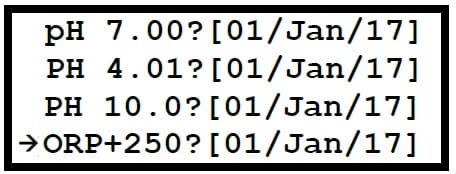
    4. Initiate Calibration: On the Aquameter, navigate to the “Calibration” menu.
    5. Select ORP: Choose “Full Cal” (or similar option that leads to individual parameter calibration) and then select “ORP” from the list of available parameters.
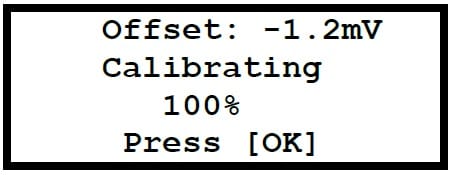
    6. Confirm Calibration: The meter will prompt you to calibrate. Confirm the calibration point. The Aquameter will process the calibration, and a success message or stable reading should appear.
    7. Completion: Once the calibration is successful, press “OK” or “ESC” repeatedly to return to normal reading mode.
    8. Post-Calibration: Remove the probe from the calibration solution, wash it thoroughly with deionised water, and replace the storage cap on the pH/ORP electrode.

This single-point calibration ensures the ORP electrode is accurately measuring against a known standard.

PH/ORP Electrode Storage

The PH/ORP Electrode is a clear gel-filled and the electrode cap contains a sponge that should be kept moist with a few drops of pH Electrode Storage Solution (Part No, SS-25) when the probe isn’t being used. The storage cap is essential for maintaining the integrity and performance of the pH and ORP electrode. These electrodes contain a sensitive glass membrane and a reference junction that must remain hydrated. If they are allowed to dry out, the electrode can be permanently damaged, leading to inaccurate readings and premature failure.


SS-25

£11.00

25ml Storage Solution for pH/ORP Electrodes.
MORE INFO
Add to basket

links

  • About
  • Contact
  • Custom Systems
  • Privacy & Cookies
  • Terms & Conditions

omni instruments

Omni Instruments Ltd,
Unit 1, 14 Nobel Road,
Wester Gourdie Industrial Estate,
Dundee, DD2 4UH, UK

Sales & Support

  • +44 (0) 1382 443000
  • info@omni.uk.com

Payments

mastercard-color
visa-color
amex-color
Copyright Omni Instruments 2026 | Design. Build. Host.

We are here to help

Need help with your products or have a question for us on our custom systems? Use the form below to send us a message and our experts will be in touch to help.

Call us on +44 (0)1382 443000

Enquire now